
Setup
How to use an old iPhone as a baby monitor (2026)
Yes. An old iPhone works as a baby monitor if it still runs iOS 16 or later, stays plugged in, and sits on a stand aimed at the crib. You watch on a second iPhone or iPad. Apple's iOS 16 list starts at the iPhone 8 from 2017, so most spare phones qualify. No SIM card is needed; Wi-Fi is enough.
Why an old iPhone makes a good baby station
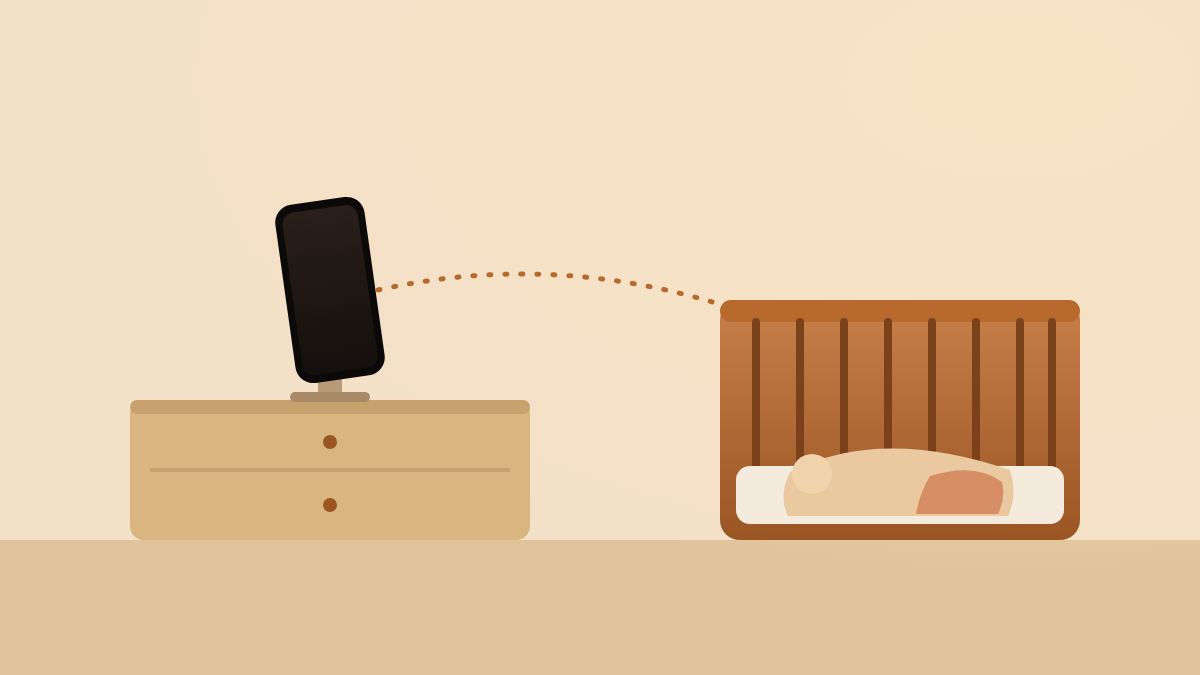
An old iPhone already has the three parts a video baby monitor needs: a camera, a microphone and Wi-Fi. It also has a battery, so a short power cut does not end the night. The phone is paid for, and the app that turns it into a monitor usually costs less than a camera unit. The one thing an old phone cannot do is stand up on its own, so a small stand is part of the set-up.
The idea works because the phone does only one job. It is not your daily phone any more, so nobody takes it out of the room, and no call or game interrupts the stream. Treat it as a fixed camera that happens to run iOS, and the rest of this page is about keeping it powered, cool, connected and away from the crib.
Which iPhones work: iOS 16 or later
Any iPhone on Apple’s iOS 16 compatibility list qualifies, and that list starts at the iPhone 8 and iPhone 8 Plus from 2017 (Apple Support, 2022). Most current monitor apps, Nanuka included, need iOS 16 or later. The iPhone 7, iPhone 6s and the first iPhone SE are not on the list, so they stop at iOS 15 and cannot run these apps.
Check the phone before you plan around it. Open Settings → General → About and read the iOS version. If it shows 15 or lower, open Settings → General → Software Update. If no update is offered, the phone has reached its last iOS version.
| iPhone model | Year | Runs iOS 16? |
|---|---|---|
| iPhone 6s, 6s Plus, SE (1st generation) | 2015–2016 | No, stops at iOS 15 |
| iPhone 7, 7 Plus | 2016 | No, stops at iOS 15 |
| iPhone 8, 8 Plus, X | 2017 | Yes |
| iPhone XR, XS, XS Max | 2018 | Yes |
| iPhone 11, 11 Pro, 11 Pro Max | 2019 | Yes |
| iPhone SE (2nd generation) | 2020 | Yes |
| iPhone 12 family | 2020 | Yes |
| iPhone 13 family, SE (3rd generation) | 2021–2022 | Yes |
| iPhone 14 family and every newer iPhone | 2022 onwards | Yes |
The “Yes” rows match Apple’s list of 23 supported models for iOS 16 (Apple Support, 2022). A phone on that list that later moved to iOS 17 or 18 is fine too; the floor is iOS 16, not the ceiling. An iPad on iPadOS 16 or later works the same way.
No SIM card needed: Wi-Fi is enough
No. The old iPhone does not need a SIM card or a mobile plan. A baby monitor app sends its video over the internet, and the phone reaches the internet through your home Wi-Fi. A phone with no SIM, or with an expired SIM, connects to Wi-Fi exactly like a phone with one.
Taking the SIM out has one small benefit: the old number cannot ring the phone in the baby’s room. If you keep the SIM in, turn on Do Not Disturb instead (step 8 below). Mobile data only matters for the device you carry; that one can watch over Wi-Fi or over its own data plan.
Set up the old iPhone, step by step
The whole set-up takes about twenty minutes, most of it waiting for updates. Do it in the daytime, not at bedtime.
- Back up and clean up the phone. Open Settings → General → Transfer or Reset iPhone → Erase All Content and Settings if the phone is a hand-me-down. If it is your own old phone, simply delete the apps you no longer use.
- Update iOS. Open Settings → General → Software Update and install the latest version the phone is offered. Security fixes matter on a device that streams video from your home.
- Join your Wi-Fi. Use the same network as the device you will watch on. Stand where the phone will sit and check that the Wi-Fi icon shows at least two bars.
- Install a monitor app on both devices. The old phone becomes the camera side; the phone or iPad you carry becomes the viewer. Pair them the way the app asks, usually with a code or a QR code.
- Plug the phone in. Use a wall charger, not a battery pack, and route the cable along the wall away from the crib. The safety section below has the distance rule.
- Put it on a stand. A cheap phone stand or a small tripod on a dresser, shelf or wall mount works. Aim the camera across the room at the crib. Never rest the phone on the crib rail or on the mattress.
- Keep the screen awake. A good monitor app keeps the screen on while it streams. If yours does not, open Settings → Display & Brightness → Auto-Lock and choose Never. Turn the brightness down so the screen does not light the room.
- Silence the phone. Open Settings → Focus → Do Not Disturb and turn it on. Flip the ring/silent switch to silent. Without this, a late text or a spam call plays through the speaker next to your baby.
- Turn off things you do not need. Bluetooth, Siri on the lock screen and app notifications can all be switched off. Fewer interruptions means a steadier stream.
- Do a test run. Start the stream, walk to the room you will sit in, and check that you can see and hear the crib. Then check the phone after an hour: it should be warm at most, never hot, and still charging.
Power and heat: plugged in, uncovered
Keep the old iPhone plugged in all night and leave it uncovered. Streaming video for eight hours drains any phone battery, and an old battery drains faster. The charger solves the battery; air solves the heat.
Apple designs iPhone for use where the ambient temperature is between 0 and 35 °C (32 to 95 °F) (Apple Support, 2025). Its safety guide is specific about charging: “Keep your iPhone, the power adapter, and any wireless charger in a well-ventilated area when in use or charging” (Apple Support, 2025). The same page asks you not to put a charging phone under a blanket or a pillow (Apple Support, 2025). A phone standing in open air on a dresser meets all of that; a phone face-down on a cot blanket does not.
In our own overnight runs with an old iPhone as the camera side, plugged in and on a stand, the phone stayed cool to the touch by morning. That is one home and one phone, not a lab result, so check your own device after the first night. If it ever feels hot, move it out of direct sunlight or away from a radiator, and lower the screen brightness. Apple lists “Leaving your device in a car on a hot day” and long periods in direct sunlight among the conditions that make an iPhone overheat (Apple Support, 2025). A nursery rarely has either.
Range and internet: both devices need a connection
There is no distance limit with an internet-based monitor app. The two devices find each other over the internet, so you can watch from the next room, the garden or another city. Both devices do need some internet connection: the old iPhone over your home Wi-Fi, and the device you carry over Wi-Fi or mobile data.
This is the main difference from a classic radio monitor. A radio monitor works with no internet at all but stops at the edge of the house. An app has no range at all without a network, and unlimited range with one. If your home Wi-Fi drops, the stream stops until it comes back, and a good app says so on screen instead of showing a frozen picture. For where the video travels on its way to you, see where baby monitor video goes.
Safety: cords, the crib and what no monitor can do
Keep the phone and its charging cable well out of your baby’s reach. The U.S. Consumer Product Safety Commission counted 7 infant and toddler deaths and 3 near-strangulations in baby monitor cords between 2002 and early 2011 (CPSC, 2011). Its rule is short: “at least 3 feet away is where your monitor should stay” (CPSC, 2012). That is about 1 metre from any part of the crib, bassinet or play yard, and it applies to a phone cable exactly as it applies to a camera cable. The CPSC’s standing advice is to keep all cords and monitor parts out of the reach of babies and young children (CPSC, 2011).
Never put the phone inside the crib, and never prop it on the rail. The AAP’s 2022 safe-sleep policy warns that soft objects and loose items in the sleep area raise the risk of entrapment, suffocation and strangulation, and asks for a crib that holds nothing but a fitted sheet (AAP, 2022). A phone is one more object; it belongs across the room.
Finally, know what a monitor is for. Around 3,500 babies die each year in the United States in sleep-related deaths, and the AAP’s policy says: “Don’t use home cardiorespiratory monitors as a way to reduce the risk of SIDS” (AAP, 2022). A video or audio monitor lets you hear and see your baby from another room. It does not replace back sleeping, a firm flat surface, and a clear crib.
Four things to know before you rely on it
An old iPhone is a good camera. Four things are worth knowing before you rely on it.
- The battery is old. A phone that is several years old may hold half its original charge. That is fine while it is plugged in, but it means a power cut gives you less warning. Check Settings → Battery → Battery Health and expect a low number.
- Dark rooms are hard. Dedicated monitors use infrared LEDs to see in a black room. A phone camera needs a little light: a dim night light or the glow from a hallway is enough.
- The phone must stay awake and in the foreground. If someone opens another app on the old phone, or iOS locks the screen, the stream stops. A stand in a room nobody enters keeps this from happening.
- Two devices, one job. The old phone is busy all night, and the device you carry shows the feed. The trade-offs between the categories are in baby monitor app vs dedicated monitor.
Where Nanuka fits
Nanuka turns two Apple devices you already own into a baby monitor. One device, the Baby Station, sits near the crib and streams live video and audio. The other, the Monitoring Station, is the one you keep with you. An old iPhone or iPad on iOS 16 or later makes an ideal Baby Station, as long as it can be kept plugged in. There is no extra hardware to buy, no account to create, and the video never passes through a server.
Pairing takes a QR code or a six-character code, and no email address or password at any point. The live stream travels directly between your two paired devices over an encrypted connection; it is never stored on a server, including ours. Cry detection runs on the Baby Station with an on-device machine-learning sound classifier built for baby cries, and alerts reach the Monitoring Station as Time Sensitive notifications. Nanuka keeps the Baby Station screen from locking on its own, so step 7 above is handled for you.
What you need: two devices, both with an internet connection. If a cry alert does not reach you at night, the fix is usually a Focus setting: see baby monitor alerts silenced on iPhone. How the on-device detection works is in cry detection on-device, and the security questions parents ask most are in can baby monitors be hacked.
Questions parents ask next
Does the old iPhone need a SIM card?
No. It needs Wi-Fi only. You can leave the old SIM in, take it out, or use a phone that never had one. Remove the SIM if you do not want the phone to ring.
Can I use an old iPad instead of an old iPhone?
Yes. An iPad on iPadOS 16 or later works the same way. Its larger body stands up more easily, but check that the camera on the stand still points at the crib.
Will the old iPhone overheat if it charges all night?
Normal warmth is expected. Apple designs iPhone for an ambient temperature of 0 to 35 °C and asks you to keep it in a well-ventilated area while charging. In our own overnight runs the phone stayed cool to the touch. Keep it uncovered and off soft surfaces.
How far away can I be from the baby's room?
With an internet-based app there is no distance limit. Both devices need an internet connection, over Wi-Fi or mobile data. If either side loses its connection, the feed stops until it returns.
Is a phone baby monitor safe near the crib?
It is safe when the phone and its cable are out of reach. The CPSC asks for monitor cords at least 3 feet (about 1 metre) from any part of the crib. Never put the phone inside the crib.
Does a baby monitor app replace a dedicated monitor?
For most families, yes, if you have a spare device and reliable Wi-Fi. A dedicated monitor wins when you have no internet or want a parent unit with no phone. The comparison post covers the trade-offs.
Sources
- iPhone models compatible with iOS 16 — Apple Support, 2022
- If your iPhone or iPad gets too hot or too cold — Apple Support, 2025
- Important safety information for iPhone — Apple Support, 2025
- Baby Monitor Cords Have Strangled Children — U.S. Consumer Product Safety Commission, 2011
- Baby Monitor Cords: 3 Feet from Baby — U.S. Consumer Product Safety Commission, 2012
- How to Keep Your Sleeping Baby Safe: AAP Policy Explained — American Academy of Pediatrics (HealthyChildren.org), 2022
Published 15 Oct 2026 · Written by Team Nanuka; every fact is checked against the sources above before it is published.